Si necesita asesoramiento o asistencia inmediata con respecto a cualquiera de nuestros productos, por favor contacte el servicio de soporte de INNOVATEST. En muchos casos, el servicio de soporte puede ofrecer asistencia inmediata para responder a cualquier pregunta que usted pueda tener o resolver cualquier problema de forma rápida y eficaz.


Los productos INNOVATEST se distribuyen actualmente en más de 80 países de todo el mundo. La venta de todos los productos se organiza localmente a través de las sedes o distribuidores locales de INNOVATEST.
Pida su cita para una demostración PERSONAL EN LÍNEA de los productos INNOVATEST.
Usted es bienvenido a contactarnos para una demostración en línea de nuestros equipos de ensayo de dureza.
Envíenos sus muestras y díganos cómo quiere que se prueben. Nuestro especialista en aplicaciones ofrecerá varias opciones de combinaciones de durómetros/accesorios, resultados de los ensayos, informes y expresará cualquier beneficio de costo asociado con cada posible selección de durómetros. Programaremos una demostración en línea en tiempo real para que pueda ver y presenciar los «Durómetros más avanzados técnicamente» en acción con sus muestras. Los resultados serán probados y verá en línea o fuera de línea cómo una o más de nuestras máquinas pueden probar sus muestras.
Pida a uno de nuestros especialistas de aplicaciones que le haga una demostración en vivo de uno o más de nuestros durómetros y sus accesorios.
Estamos soportando múltiples soluciones de sistemas de escritorio compartido para demostraciones en vivo como por ejemplo, pero no limitadas a: Microsoft Teams, Skype o TeamViewer.
Para más información:
Contacte directamente a nuestra oficina de ventas demo@innovatest-europe.com, demo@innovatest-usa.com o contacte a su distribuidor local para obtener más información o para acordar una cita.
Los durómetros funcionan en su máximo rendimiento cuando se instalan profesionalmente en su taller o laboratorio. Aunque la mayoría de las máquinas de INNOVATEST están preparadas a un nivel de ''enchufar y jugar'', deben ser verificadas para los estándares de calibración después de ser transportadas. Esto es independiente de si el movimiento de la máquina es transporte interno o externo.
Si los durómetros son transportados por carretera, por ferrocarril o por aire de un lugar a otro, deben ser empacados en su caja original (en su mayoría) de madera y asegurados al fondo de la caja. El transporte aéreo puede ser costoso y por lo tanto INNOVATEST entrega una caja ligera que puede ser totalmente desarmada y almacenada para su uso posterior.
INNOVATEST tiene equipos de servicio entrenados en la sede central, ubicados en todo el mundo, para ayudar en la instalación adecuada de su durómetro. Nuestros distribuidores en todo el mundo están capacitados para ser expertos en la instalación y la prestación de formación operativa, asegurándose de que su equipo tenga la experiencia más productiva y conocedora de nuestros productos. ¡Háganos saber cómo podemos ayudarle!
Nuestro experimentado equipo de servicio puede asesorarlo a usted sobre cómo trasladar su durómetro o mejor aún, sobre cómo encargarse de la planificación detallada, la preparación del transporte, la reinstalación, la calibración y la certificación de su durómetro. No dude en solicitar nuestro asesoramiento gratuito. En casi todo el mundo, ¡Estamos cerca de usted!
Los productos de INNOVATEST se distribuyen actualmente en más de 80 países de todo el mundo. La venta de todos los productos se organiza localmente a través de las sedes o distribuidores locales de INNOVATEST.
Un equipo profesional de especialistas en productos y asesores comerciales ofrece una amplia gama de formación comercial y técnica a nuestro propio personal y a los distribuidores de todo el mundo, para satisfacer mejor las necesidades de nuestros clientes.
La formación para usuarios finales se organiza normalmente a nivel local en sus propias instalaciones.
Por favor utilice el siguiente formulario para registrar su producto Innovatest INNOVATEST®
Reduciendo su riesgo del tiempo de improductividad. Nuestros ingenieros de servicio están disponibles para realizar control regular y mantenimiento estándar en cualquiera de nuestros durómetros independientemente de su ubicación.
Durante el control de su durómetro, nuestro personal de servicio está capacitado para actualizar el software a la última revisión de las normas y versiones aplicables, si es necesario. Además, usted puede contar con la amplia experiencia de nuestro equipo de servicio para atender las necesidades de calibración/verificación anual de su equipo de ensayo de dureza en función de los requisitos de su sistema de calidad.
Report a Security Vulnerability
The security of INNOVATEST products and the protection of our customers are important to us. We welcome responsible reports from customers, distributors, security researchers and other parties who believe they have discovered a potential security vulnerability.
This page explains how to report a vulnerability and how INNOVATEST handles reported security issues.
How to Report a Vulnerability
Please report potential security vulnerabilities through one of the following channels:
Email: security@innovatest-europe.com
Please do not use the general sales or service contact form or channels for security vulnerabilities.
What Can Be Reported?
You can use this reporting channel for potential vulnerabilities involving:
For ordinary technical problems, calibration questions, software installation assistance or warranty requests, please contact our regular support team.
Information to Include
Please provide as much of the following information as possible:
Please remove passwords, customer measurement data and unnecessary personal information before submitting files.
What Happens After You Report?
After receiving a vulnerability report, INNOVATEST will:
Resolution time depends on the complexity, severity and impact of the vulnerability. INNOVATEST will provide reasonable status updates while the investigation remains active.
Coordinated Vulnerability Disclosure Policy
We ask security researchers to follow these principles:
Prohibited Testing
The following activities are not authorised under this policy:
This policy does not grant permission to perform security testing where you do not otherwise have authorisation.
Good-Faith Security Research
When you act in good faith, comply with this policy and make a reasonable effort to prevent harm, INNOVATEST does not intend to initiate legal action solely because of your security research.
If you are unsure whether your intended testing is permitted, contact service@innovatest-europe.com before proceeding.
Confidentiality and Public Disclosure
Please keep vulnerability information confidential until:
INNOVATEST may publish information about resolved vulnerabilities, including:
INNOVATEST may delay publication when early disclosure could increase the cybersecurity risk to customers.
Security Updates and Product Support
Security updates addressing identified cybersecurity vulnerabilities are provided free of charge during the applicable product support period. Security updates are separate from functional enhancements, optional features or paid software upgrades.
During the applicable product support period, INNOVATEST provides information about relevant security updates and corrective measures. Customers should install security updates within the recommended timeframe, even when the product appears to be functioning normally.
Some software and firmware updates must be installed by an authorised INNOVATEST service engineer. Contact INNOVATEST or your authorised distributor for the correct installation procedure.
Personal Data
Personal data included in a vulnerability report will only be used to:
Please refer to our Privacy Policy for further information.
INNOVATEST Europe B.V.
Borgharenweg 140
6222 AA Maastricht
The Netherlands
Product Security: security@innovatest-europe.com
Telephone: +31 43 352 00 60
General support: service@innovatest-europe.com
En INNOVATEST creemos que nuestro negocio es un "estilo de vida". Esta creencia da como resultado los mejores durómetros del mundo. Nuestros más de 130 empleados son apasionados de nuestro estilo de vida y creando así productos y una organización que ofrece una experiencia de usuario de primera calidad y la mejor garantía de fabricación disponible hoy en día.
A partir de la fecha en la que usted recibe su durómetro nuevo, nuestra garantía estándar es de 24 meses.
CONSEJO: Seleccione uno de los 3 paquetes de extensión de garantía, vea las opciones abajo:



*Por favor pregunte a nuestro departamento de ventas por todos los detalles.
This page contains most of the information about the INNOVATEST app. We explain the most important functionalities per screen. If you still have questions after reading this page, please fill in the contact form at the bottom of the page. We will get back to you as soon as possible!
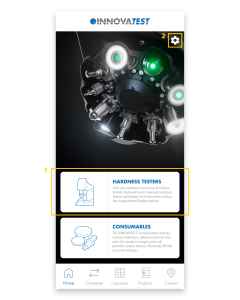
1.
This is the page you will land on after starting the app. You can use the white blocks to quickly navigate to the Products page – Hardness Testers or the Products page – Consumables.
2.
The settings-icon on the top right takes you to the Settings. Here you can change the language of the app and see which version of the app is installed.
1.
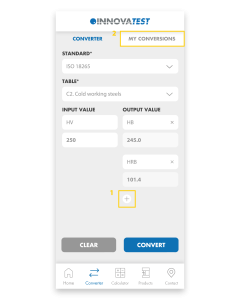
Easily convert your hardness values to other scales. First, select the Standard and then choose the Table. Select the Input and enter the value you measured. Easily add multiple Outputs and then click ‘Convert’ to convert the value.
2.
All converted values are automatically saved in My Conversions.
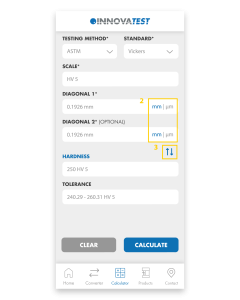
1.
The app will calculate the Hardness, Diagonals and Tolerances for you. Choose the Test Method and Standard, select the Scale you want to use and fill in the Diagonals. Press ‘Calculate’ and the app will calculate the Hardness and Tolerance for you.
2.
You can easily switch between mm and μm by clicking on these abbreviations.
3.
By clicking on the blue arrows you can change Diagonals to Hardness. That way you can calculate the Diagonals or Diameter from the Hardness value.
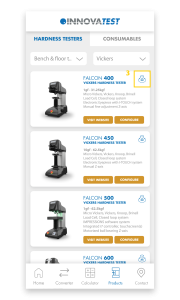
1.
Visit our full range of products on this page. The Products page consists of Hardness Testers and Consumables. Under Hardness Testers you will find Hardness testers and Portables. Our Consumables consist of Indenters, Reference blocks and Sets.
2.
Each product block consists of a number of buttons; ‘Visit website’, ‘Configure’ and a 360° icon. ‘Visit website’ sends you to the website where all details about the tester are gathered. ‘Configure’ redirects you to the Configurator on our website where you can configure the machine to your liking. Once you have assembled your machine, you can easily request a quote and return to the app.
3.
The 360° icon allows you to view our testers in Augmented Reality. Using the camera of your phone, you can place our models anywhere in the real world and view them from all angles. The scale of our testers is pretty accurate so you immediately get an impression of the size of our machines. By switching to the ‘Object’ tab you can isolate the machine and scale and rotate it as you wish. If you are unable to load a tester, it usually helps to point the camera at a flat surface before clicking the 360 icon. If you move the camera slowly around, it will recognize the surface more easily and automatically load the tester.
4.
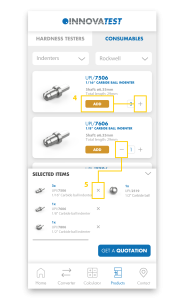
Here you can see all our consumables and add them to your shopping basket by pressing ‘+’ or ‘add’. Under ‘Selected items’ you will find all added products and you can request a quotation with one click on the button. You will automatically receive a confirmation e-mail with all selected items.
5.
To remove products from the basket, press ‘-‘ or the ‘X’ in the basket.
1.
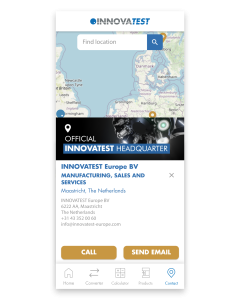
On the Contact Us page you will find all our branches and distributors. Clicking on any of our establishments will automatically display all contact information. Please feel free to contact us if you have any questions. If you have other questions regarding our app, please fill in the contact form below and we will get back to you as soon as possible.
Can’t wait to try out our new app? Scan or click the QR-code below and download our INNOVATEST Hardness Converter!