Jeśli potrzebujesz natychmiastowej porady lub pomocy w odniesieniu do któregokolwiek z naszych produktów, skontaktuj się z biurem pomocy technicznej INNOVATEST. W wielu przypadkach biuro pomocy technicznej może zaproponować natychmiastową pomoc, aby szybko i skutecznie odpowiedzieć na wszelkie pytania lub rozwiązać każdy problem.


Produkty INNOVATEST są obecnie dystrybuowane w ponad 80 krajach na całym świecie. Sprzedaż wszystkich produktów jest organizowana lokalnie za pośrednictwem filii INNOVATEST lub lokalnych dystrybutorów.
Umów się na INDYWIDUALNĄ PREZENTACJĘ ONLINE produktu Innovatest.
Zapraszamy do kontaktu z nami na pokaz naszych twardościomierzy online.
Wyślij nam swoje próbki wraz z opisem, jak chcesz je przetestować. Nasz specjalista ds. aplikacji zaoferuje kilka konfiguracji urządzenia pomiarowego/akcesoriów, wyników badań, raportów i wskaże wszelkie korzyści kosztowe związane z każdym potencjalnym wyborem twardościomierza. Zaaranżujemy prezentację online, podczas której Klient będzie na żywo śledził w akcji ‘najbardziej zaawansowane technicznie twardościomierze’ pracujące na jego próbkach. Wyniki próbki Klienta obejmujące pomiary z jednego lub więcej naszych aparatów będą do obejrzenia i sprawdzenia online lub offline.
Zwróć się do jednego z naszych specjalistów ds. aplikacji, aby przeprowadził prezentację na żywo jednego lub kilku naszych twardościomierzy i ich akcesoriów.
Obsługujemy wiele rozwiązań systemowych współdzielenia pulpitu do prezentacji LIVE, m.in.: Microsoft Teams, Skype lub TeamViewer.
Więcej szczegółów:
Aby uzyskać więcej informacji lub umówić się na spotkanie, skontaktuj się bezpośrednio z naszym biurem sprzedaży demo@innovatest-europe.com, demo@innovatest-usa.com lub z dystrybutorem w Twoim regionie.
Przyrządy do pomiaru twardości osiągają najlepszą funkcjonalność, gdy są instalowane w Twoim zakładzie lub laboratorium w sposób fachowy. Pomimo przygotowania większości aparatów INNOVATEST do działania bez wymaganej konfiguracji (plug and play), po każdym transporcie należy je zweryfikować pod względem norm kalibracji. Jest to niezależne od tego, czy jest to transport wewnętrzny czy zewnętrzny.
Jeżeli wysyłasz twardościomierz drogą lądową, kolejową lub powietrzną z jednej lokalizacji do drugiej, należy go zapakować w oryginalną (najczęściej) drewnianą skrzynię i przymocować do jej dna. Transport lotniczy może być kosztowny, dlatego Innovatest zapewnia skrzynię o niskiej wadze, z możliwością jej całkowitego demontażu i składowania do późniejszego użytku.
INNOVATEST posiada fabrycznie przeszkolone zespoły serwisowe zlokalizowane na całym świecie, które pomagają w prawidłowej instalacji twardościomierza. Nasi dystrybutorzy na całym świecie przeszli szkolenia i są specjalistami w zakresie instalacji i prowadzenia szkoleń obsługi, co gwarantuje najbardziej produktywną i kompetentną pracę Twojego zespołu z naszymi produktami. Powiedz nam, jak możemy ci pomóc!
Nasz doświadczony zespół obsługi technicznej doradzi Klientowi, jak przenieść twardościomierz, czyli zajmie się szczegółowym planowaniem, przygotowaniem jego transportu, ponowną instalacją, kalibracją i certyfikacją. Nie wahaj się zwrócić do nas o bezpłatną poradę. Działamy w twoim regionie prawie na całym świecie!
Produkty INNOVATEST są obecnie dystrybuowane w ponad 80 krajach na całym świecie. Sprzedaż wszystkich produktów jest organizowana lokalnie za pośrednictwem filii INNOVATEST lub lokalnych dystrybutorów.
Profesjonalny zespół specjalistów ds. produktów i doradców handlowych oferuje szeroki zakres szkoleń handlowych i technicznych dla własnych pracowników i dystrybutorów na całym świecie, aby jak najlepiej sprostać potrzebom naszych klientów.
Szkolenie użytkowników końcowych jest zwykle organizowane na miejscu u Klienta.
PRZEŚLIJ ZGŁOSZENIE DO SZKOLENIA
Prosze uźyj formularza poniżej aby zarejestrować twój product INNOVATEST.
Reducing your down time risk. Our service engineers are available to perform a regular check and standard maintenance on any of our testers regardless of the location.
Zmniejszenie ryzyka przestoju. Nasi technicy obsługi pozostają do dyspozycji celem przeprowadzania okresowych przeglądów i standardowej konserwacji każdego z naszych twardościomierzy bez względu na lokalizację.
Nasze przyrządy są objęte długimi okresami gwarancji, a okresowy przegląd techniczny minimalizuje lub też usuwa przykre niespodzianki.
Nasz personel techniczny jest przeszkolony do zaktualizowania oprogramowania do najnowszej wersji w razie potrzeby podczas przeglądu twardościomierza, zgodnie z obowiązującymi normami i wersją. Ponadto mogą Państwo liczyć na bogate doświadczenie naszego zespołu technicznego, który będzie doglądać corocznej konieczności kalibracji/weryfikacji Państwa twardościomierzy w oparciu o wymogi Państwa systemu jakości.
Report a Security Vulnerability
The security of INNOVATEST products and the protection of our customers are important to us. We welcome responsible reports from customers, distributors, security researchers and other parties who believe they have discovered a potential security vulnerability.
This page explains how to report a vulnerability and how INNOVATEST handles reported security issues.
How to Report a Vulnerability
Please report potential security vulnerabilities through one of the following channels:
Email: security@innovatest-europe.com
Please do not use the general sales or service contact form or channels for security vulnerabilities.
What Can Be Reported?
You can use this reporting channel for potential vulnerabilities involving:
For ordinary technical problems, calibration questions, software installation assistance or warranty requests, please contact our regular support team.
Information to Include
Please provide as much of the following information as possible:
Please remove passwords, customer measurement data and unnecessary personal information before submitting files.
What Happens After You Report?
After receiving a vulnerability report, INNOVATEST will:
Resolution time depends on the complexity, severity and impact of the vulnerability. INNOVATEST will provide reasonable status updates while the investigation remains active.
Coordinated Vulnerability Disclosure Policy
We ask security researchers to follow these principles:
Prohibited Testing
The following activities are not authorised under this policy:
This policy does not grant permission to perform security testing where you do not otherwise have authorisation.
Good-Faith Security Research
When you act in good faith, comply with this policy and make a reasonable effort to prevent harm, INNOVATEST does not intend to initiate legal action solely because of your security research.
If you are unsure whether your intended testing is permitted, contact service@innovatest-europe.com before proceeding.
Confidentiality and Public Disclosure
Please keep vulnerability information confidential until:
INNOVATEST may publish information about resolved vulnerabilities, including:
INNOVATEST may delay publication when early disclosure could increase the cybersecurity risk to customers.
Security Updates and Product Support
Security updates addressing identified cybersecurity vulnerabilities are provided free of charge during the applicable product support period. Security updates are separate from functional enhancements, optional features or paid software upgrades.
During the applicable product support period, INNOVATEST provides information about relevant security updates and corrective measures. Customers should install security updates within the recommended timeframe, even when the product appears to be functioning normally.
Some software and firmware updates must be installed by an authorised INNOVATEST service engineer. Contact INNOVATEST or your authorised distributor for the correct installation procedure.
Personal Data
Personal data included in a vulnerability report will only be used to:
Please refer to our Privacy Policy for further information.
INNOVATEST Europe B.V.
Borgharenweg 140
6222 AA Maastricht
The Netherlands
Product Security: security@innovatest-europe.com
Telephone: +31 43 352 00 60
General support: service@innovatest-europe.com
W INNOVATEST wierzymy w prowadzenie działalności jako „sposób bycia”. To przekonanie owocuje najlepszymi na świecie twardościomierzami. Ponad 130 naszych pracowników to pasjonaci naszego sposobu bycia, tworzący produkty oraz organizację, które zapewniają najwyższej jakości obsługę i najlepszą dostępną obecnie gwarancję producenta.
Nasza standardowa gwarancja wynosi 24 miesiące od daty odbioru nowego twardościomierza.
WSKAZÓWKA: Wybierz jeden z 3 pakietów przedłużenia gwarancji, zobacz poniższe opcje:



*O wszystkie szczegóły prosimy zapytać nasz dział sprzedaży.
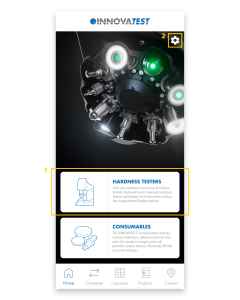
This page contains most of the information about the INNOVATEST app. We explain the most important functionalities per screen. If you still have questions after reading this page, please fill in the contact form at the bottom of the page. We will get back to you as soon as possible!
1.
This is the page you will land on after starting the app. You can use the white blocks to quickly navigate to the Products page – Hardness Testers or the Products page – Consumables.
2.
The settings-icon on the top right takes you to the Settings. Here you can change the language of the app and see which version of the app is installed.
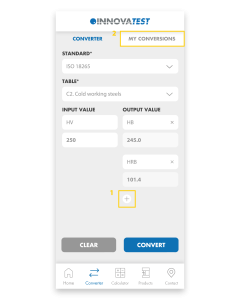
1.
Easily convert your hardness values to other scales. First, select the Standard and then choose the Table. Select the Input and enter the value you measured. Easily add multiple Outputs and then click ‘Convert’ to convert the value.
2.
All converted values are automatically saved in My Conversions.
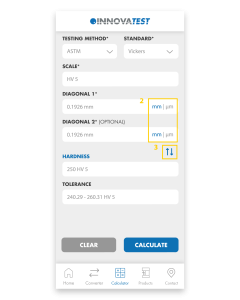
1.
The app will calculate the Hardness, Diagonals and Tolerances for you. Choose the Test Method and Standard, select the Scale you want to use and fill in the Diagonals. Press ‘Calculate’ and the app will calculate the Hardness and Tolerance for you.
2.
You can easily switch between mm and μm by clicking on these abbreviations.
3.
By clicking on the blue arrows you can change Diagonals to Hardness. That way you can calculate the Diagonals or Diameter from the Hardness value.
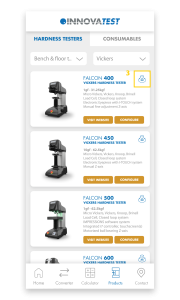
1.
Visit our full range of products on this page. The Products page consists of Hardness Testers and Consumables. Under Hardness Testers you will find Hardness testers and Portables. Our Consumables consist of Indenters, Reference blocks and Sets.
2.
Each product block consists of a number of buttons; ‘Visit website’, ‘Configure’ and a 360° icon. ‘Visit website’ sends you to the website where all details about the tester are gathered. ‘Configure’ redirects you to the Configurator on our website where you can configure the machine to your liking. Once you have assembled your machine, you can easily request a quote and return to the app.
3.
The 360° icon allows you to view our testers in Augmented Reality. Using the camera of your phone, you can place our models anywhere in the real world and view them from all angles. The scale of our testers is pretty accurate so you immediately get an impression of the size of our machines. By switching to the 'Object’ tab you can isolate the machine and scale and rotate it as you wish. If you are unable to load a tester, it usually helps to point the camera at a flat surface before clicking the 360 icon. If you move the camera slowly around, it will recognize the surface more easily and automatically load the tester.
4.
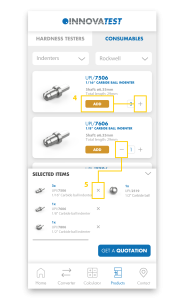
Here you can see all our consumables and add them to your shopping basket by pressing '+’ or 'add’. Under 'Selected items’ you will find all added products and you can request a quotation with one click on the button. You will automatically receive a confirmation e-mail with all selected items.
5.
To remove products from the basket, press ’-’ or the 'X’ in the basket.
1.
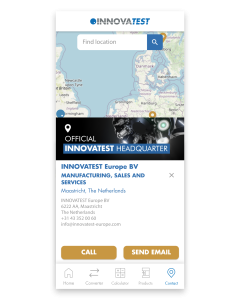
On the Contact Us page you will find all our branches and distributors. Clicking on any of our establishments will automatically display all contact information. Please feel free to contact us if you have any questions. If you have other questions regarding our app, please fill in the contact form below and we will get back to you as soon as possible.
Can’t wait to try out our new app? Scan or click the QR-code below and download our INNOVATEST Hardness Converter!