当社の製品に関するアドバイスや支援が必要な場合は、INNOVATESTのサポートデスクにお問い合わせください。サポートデスクは、お客様の質問に迅速に回答したり、問題を迅速かつ効果的に解決したりするための情報を提供できます。















INNOVATESTの製品は現在、世界80カ国以上で販売されています。 すべての製品の販売は、INNOVATESTの子会社または現地の販売代理店を通じて行われます。
INNOVATEST製品のデモはオンラインにてご予約ください。
弊社の硬さ試験機のオンラインにてデモのご連絡をお待ちしております。
サンプルをお送りいただき、どのようにテストしたいかをお知らせください。当社のアプリケーションスペシャリストは、試験機/付属品の組み合わせ、試験結果、レポートのいくつかのオプションを提供し、硬さ試験機のそれぞれの可能な選択に関連するあらゆるご提案をします。サンプルを使用して「最先端の硬さ試験機」の動作を確認できるように、オンラインのリアルタイムデモをスケジュールします。テスト結果はオンラインまたはオフラインでご覧いただけます。
弊社のアプリケーションスペシャリストが、弊社の硬さ試験機とその付属品の1つ以上のライブデモンストレーションを行います。
LIVEデモでは、Microsoft Teams、Skype、TeamViewerのような複数のデスクトップ共有システムソリューションをサポートしています。
詳細については、以下を参照してください。
弊社の営業所demo@innovatest-europe.com、demo@innovatest-usa.comに直接お問い合わせいただくか、最寄りの販売代理店にお問い合わせいただき、詳細やご予約をお取りください。
硬さ試験装置は、専門家の手で作業場や実験室に設置する必要があります。ほとんどのINNOVATEST機器は 「プラグアンドプレイ」 レベルに対応していますが輸送のたびにキャリブレーション資料と照合する必要があります。 これは、内部輸送か外部輸送かには関係ありません
試験機をトラック、列車、または飛行機で移動する場合は、パレットに梱包し、箱の底に固定する必要があります。Innovatestは、後にマシンを移動できるように、完全に分解して保管できる軽量のクレートを提供しています。
INNOVATESTには、硬さ試験機を適切に設置するためのグローバルな運用サービスチームがあります。当社のグローバル販売代理店は、機器設置の専門家になるよう訓練されています。 経験豊富なサービスチームが、テスターの移動方法、または詳細な計画、輸送準備、再設置、校正、およびテスターの認証の方法についてアドバイスします。 無料アドバイスをお気軽にお尋ねください。
イノバテスト製品は、世界80ヶ国以上で販売されています。全ての製品の販売は、イノバテストの子会社または現地販売代理店を通じて行われます。
専門の販売チームは、お客様のニーズを最大限に満たすため、スタッフおよび世界中の販売店に対して幅広い製品トレーニングを提供しています。お客様へのトレーニングは通常、お客様の施設にて実施いたします。
下記のフォームよりイノバテスト製品登録をお願いします。
ダウンタイムのリスクを軽減します。当社のサービスエンジニアは、場所を問わず、すべての試験機に対して定期的なチェックと標準メンテナンスを行っています。
当社の機械は長期保証制度でカバーされていますが、定期的なサービスをおすすめします。
硬度計の検査中に、当社のスタッフがソフトウェアを最新の規格とリリースに更新することができます。 さらに、試験装置の毎年の校正を行うことができます。
Report a Security Vulnerability
The security of INNOVATEST products and the protection of our customers are important to us. We welcome responsible reports from customers, distributors, security researchers and other parties who believe they have discovered a potential security vulnerability.
This page explains how to report a vulnerability and how INNOVATEST handles reported security issues.
How to Report a Vulnerability
Please report potential security vulnerabilities through one of the following channels:
Email: security@innovatest-europe.com
Please do not use the general sales or service contact form or channels for security vulnerabilities.
What Can Be Reported?
You can use this reporting channel for potential vulnerabilities involving:
For ordinary technical problems, calibration questions, software installation assistance or warranty requests, please contact our regular support team.
Information to Include
Please provide as much of the following information as possible:
Please remove passwords, customer measurement data and unnecessary personal information before submitting files.
What Happens After You Report?
After receiving a vulnerability report, INNOVATEST will:
Resolution time depends on the complexity, severity and impact of the vulnerability. INNOVATEST will provide reasonable status updates while the investigation remains active.
Coordinated Vulnerability Disclosure Policy
We ask security researchers to follow these principles:
Prohibited Testing
The following activities are not authorised under this policy:
This policy does not grant permission to perform security testing where you do not otherwise have authorisation.
Good-Faith Security Research
When you act in good faith, comply with this policy and make a reasonable effort to prevent harm, INNOVATEST does not intend to initiate legal action solely because of your security research.
If you are unsure whether your intended testing is permitted, contact service@innovatest-europe.com before proceeding.
Confidentiality and Public Disclosure
Please keep vulnerability information confidential until:
INNOVATEST may publish information about resolved vulnerabilities, including:
INNOVATEST may delay publication when early disclosure could increase the cybersecurity risk to customers.
Security Updates and Product Support
Security updates addressing identified cybersecurity vulnerabilities are provided free of charge during the applicable product support period. Security updates are separate from functional enhancements, optional features or paid software upgrades.
During the applicable product support period, INNOVATEST provides information about relevant security updates and corrective measures. Customers should install security updates within the recommended timeframe, even when the product appears to be functioning normally.
Some software and firmware updates must be installed by an authorised INNOVATEST service engineer. Contact INNOVATEST or your authorised distributor for the correct installation procedure.
Personal Data
Personal data included in a vulnerability report will only be used to:
Please refer to our Privacy Policy for further information.
INNOVATEST Europe B.V.
Borgharenweg 140
6222 AA Maastricht
The Netherlands
Product Security: security@innovatest-europe.com
Telephone: +31 43 352 00 60
General support: service@innovatest-europe.com
INNOVATESTでは、私たちのビジネスは 「ライフスタイル」 であると考えています。これにより、世界最高レベルの硬さ試験機を実現しています。 130人以上の従業員が当社のライフスタイルに情熱を傾け、最高のユーザーエクスペリエンスと最高のメーカー保証を提供する製品と組織を生み出しています。
新しい硬度計を設置した日から、当社の標準保証期間は24ヶ月です。
情報:3つの保証延長パッケージのいずれかを選択します。以下のオプションを参照 してください。

ゴールド保証


*詳細については営業部門にお問い合わせください
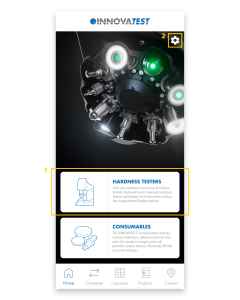
This page contains most of the information about the INNOVATEST app. We explain the most important functionalities per screen. If you still have questions after reading this page, please fill in the contact form at the bottom of the page. We will get back to you as soon as possible!
1.
This is the page you will land on after starting the app. You can use the white blocks to quickly navigate to the Products page – Hardness Testers or the Products page – Consumables.
2.
The settings-icon on the top right takes you to the Settings. Here you can change the language of the app and see which version of the app is installed.
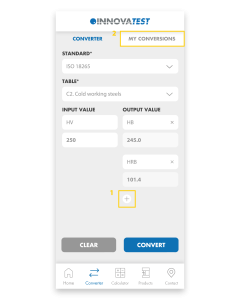
1.
Easily convert your hardness values to other scales. First, select the Standard and then choose the Table. Select the Input and enter the value you measured. Easily add multiple Outputs and then click ‘Convert’ to convert the value.
2.
All converted values are automatically saved in My Conversions.
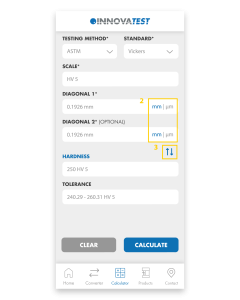
1.
The app will calculate the Hardness, Diagonals and Tolerances for you. Choose the Test Method and Standard, select the Scale you want to use and fill in the Diagonals. Press ‘Calculate’ and the app will calculate the Hardness and Tolerance for you.
2.
You can easily switch between mm and μm by clicking on these abbreviations.
3.
By clicking on the blue arrows you can change Diagonals to Hardness. That way you can calculate the Diagonals or Diameter from the Hardness value.
1.
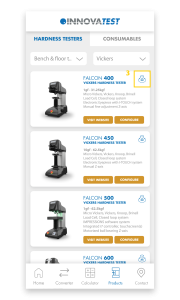
Visit our full range of products on this page. The Products page consists of Hardness Testers and Consumables. Under Hardness Testers you will find Hardness testers and Portables. Our Consumables consist of Indenters, Reference blocks and Sets.
2.
Each product block consists of a number of buttons; ‘Visit website’, ‘Configure’ and a 360° icon. ‘Visit website’ sends you to the website where all details about the tester are gathered. ‘Configure’ redirects you to the Configurator on our website where you can configure the machine to your liking. Once you have assembled your machine, you can easily request a quote and return to the app.
3.
The 360° icon allows you to view our testers in Augmented Reality. Using the camera of your phone, you can place our models anywhere in the real world and view them from all angles. The scale of our testers is pretty accurate so you immediately get an impression of the size of our machines. By switching to the ‘Object’ tab you can isolate the machine and scale and rotate it as you wish. If you are unable to load a tester, it usually helps to point the camera at a flat surface before clicking the 360 icon. If you move the camera slowly around, it will recognize the surface more easily and automatically load the tester.
4.
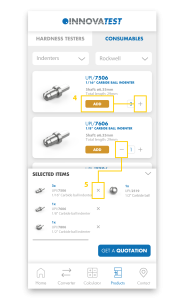
Here you can see all our consumables and add them to your shopping basket by pressing ‘+’ or ‘add’. Under ‘Selected items’ you will find all added products and you can request a quotation with one click on the button. You will automatically receive a confirmation e-mail with all selected items.
5.
To remove products from the basket, press ‘-‘ or the ‘X’ in the basket.
1.
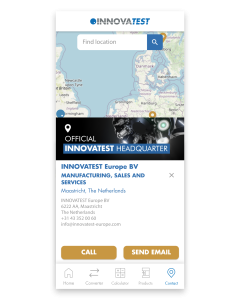
On the Contact Us page you will find all our branches and distributors. Clicking on any of our establishments will automatically display all contact information. Please feel free to contact us if you have any questions. If you have other questions regarding our app, please fill in the contact form below and we will get back to you as soon as possible.
Can’t wait to try out our new app? Scan or click the QR-code below and download our INNOVATEST Hardness Converter!